
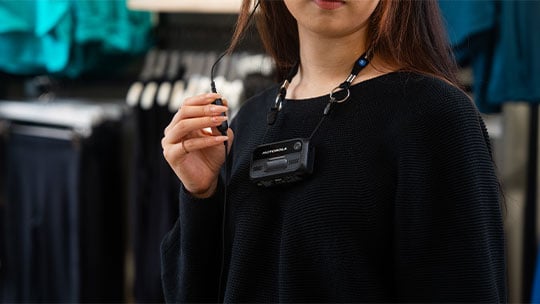
V200 product updates
September 2026
26.3 release
New features
Menu button expansion
The V200 now includes an expanded on-device menu that allows operators to pair and reconnect to LMR devices via Bluetooth as well as power off the camera. Administrators can also disable the menu through the profile configuration in VideoManager if they don't want their employees to access the functionality.
Peer Assisted Recording (PAR)
Peer Assisted Recording is now supported on the V200, operating seamlessly with existing M500, VB400 and V500 fleets. The camera can send and receive PAR requests to trigger recording on nearby peer devices during critical events.
No Record Zone (NRZ)
To maintain privacy in sensitive areas, the NRZ feature prevents V200 from recording upon approaching or entering pre-determined spaces. Using Bluetooth BLE beacons and RSSI signal detection, the device identifies configured zones and halts or prevents recording without requiring manual user intervention.
Separate audio tracks
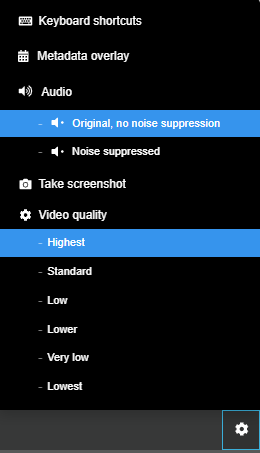
Administrators can now select between original and noise-cancelled audio tracks when reviewing offloaded footage in VideoManager. This toggle helps ensure clear audio selection during critical post-incident investigations.
Bookmarking
Operators can now create bookmarks at key moments during active recordings using the pre-configured button on their V200. These timestamps cleanly transfer to VideoManager, allowing reviewers to quickly jump to critical event markers during playback.
Recording LED customization
Administrators can now customize the active recording LED beyond the standard solid red; new configurable options include solid green and blinking red.
To learn more about the V200 body camera, click here.
Don't miss the latest features or product news! Click here to update your communication preferences.
May 2026
26.2 release
New features
Motorola Solutions radio integration via Bluetooth
The V200 now supports radio integration with MOTOTRBO models via a Bluetooth connection. This allows the V200 to seamlessly trigger recording when a staff member presses the MOTOTRBO radio emergency button. By automating this workflow, camera wearers can immediately call for backup and record the incident simultaneously, allowing them to focus entirely on their safety and resolving the situation. Support is available for R5, R7 and the XPR 7000e/XPR 5000e series.
Discreet escalation (panic button)
A new discreet escalation feature allows for silent triggering using the standard escalation button gesture. This helps ensure frontline workers can silently and safely signal for assistance without escalating a tense situation or alerting an aggressor. This mode uses haptic-only feedback by default to maintain discretion, though admins can customize both the haptic and LED settings.
Configurable tones and haptics for live streaming
V200 notifications for joining or exiting a live stream are now fully configurable. Admins can enable or disable both the haptic feedback and audible tones for live streaming.
Default and locked volume control
V200 audio settings feature an enhanced default volume control and an additional volume lock toggle. Admins can set a preferred default volume and easily choose to lock out volume adjustments via the physical V200 volume buttons. This helps prevent staff from accidentally changing audio settings during active shifts so that critical system notifications and communication lines remain clearly audible at all times.
Standby mode and power button gestures
New power management settings allow admins to configure the V200 to enter a standby state during periods of inactivity. Additionally, new button combinations manage device power, keeping the device unresponsive to button presses until the full power-on sequence is completed.
New accessories
Single Unit Charger
Designed specifically for the V200 and purpose-built with thermal and charge protection features, the Single Unit Charger delivers dedicated charging for lone workers and smaller sites and helps eliminate issues with missing standalone USB-C chargers. The charger also enables full remote Wi-Fi management and features optional regional power supplies and interlocking brackets to keep your tabletop setup neat and organized.
Magnet Mount
The new low-profile Magnet Mount attaches easily to a wide variety of uniforms, providing V200 wearers with a sleek, versatile mounting option complete with built-in lanyard slots. Its design allows personnel to seamlessly charge their camera in both the Single Unit Charger and 8-port Smart Dock, without ever removing the mount.
Minor enhancements
Enhanced Wi-Fi status visibility
This update introduced a signal strength indicator to the Wi-Fi icon to reflect the device's connection strength.
To learn more about the V200 body camera, click here.
Don't miss the latest features or product news! Click here to update your communication preferences.
December 2025
V200 body camera: Wi-Fi Docking
The V200 now supports video offloading, deletion and device management via Wi-Fi without requiring a physical Smart Dock station.* This capability is ideal for supporting lone workers or small-footprint enterprise locations where centralized docking infrastructure is not practical or necessary.
This feature also ensures continuous data security and device compliance even in the most remote locations where cameras are decentralized from docking infrastructure. The wireless connection enables the following key tasks:
- Footage offload and deletion: Automatic and secure transfer of captured evidence
- Applying new/updating profiles: Keeping device configurations current
- Firmware upgrades: Ensuring devices run the latest secure software
- Device assignment/unassignment: Managing user access
- Auditing: Viewing and downloading the Device Audit Log for compliance checks
*A Smart Dock is still required for initial camera out-of-box provisioning.
For more information on additional V200 body camera enhancements, please reference the V200 FW 25.4.0.9 Release Notes and the VideoManager EX 25.4 Release Notes.
August 2025
GoLive Audio support
GoLive audio facilitates real-time, bi-directional communication between a camera operator and a remote agent or supervisor via Wi-Fi during an escalation. This safety feature ensures that employees have immediate access to a supervisor or security team at a moment’s notice. Supervisors or security personnel can deliver clear guidance from VideoManager EX to an employee in distress or de-escalate the situation with an aggressor.
VideoManager EX offers a user-friendly interface that visually notifies supervisors or security personnel when a device starts recording or triggers an escalation. This allows operators to easily stream video and initiate two-way conversations.
This update empowers remote agents with smoother and more effective communication during escalations.
25.2 release for both the V200 body camera and VideoManager EX is required to enable GoLive Audio.
For more information on additional V200 body camera enhancements, please reference V200 25.2.1.4 device release notes and 25.2 VideoManager EX software release notes.