
What's new with CommandCentral DEMS
Streamline your digital evidence management workflow with the latest updates. Discover enhanced features for bulk actions, improved file conversion and advanced AI-assisted redaction capabilities.
Restore full access of archived digital evidence that is pushed from VideoManager EL to CommandCentral DEMS. The standard format protects assets by showing only the metadata. If you need to reactivate any assets, you can still do so within 15 hours.
Get more out of your evidence file markers with the ability to download them.
'View all' permissions can now be broken out between view all non-restricted and view all restricted content.
Administrators now have the ability to create new tag categories that provide the option to assign a simple tag or allow the assignment of multiple tags.
A share package created in DEMS can now be reshared, or forwarded, by the package recipient. Reshare is always 'share via email' and can be optionally protected by password. Reshare forwards the full package to the recipient.
When enabled, this feature will pair your holster or taser to your SVX so that when it's drawn, SVX automatically starts recording.
When SVX is checked out, you can quickly verify the officer ID by enabling the SVX to announce it. This feature can be enabled or disabled for users depending on preferences.
To learn more about these features and updates, view the release notes.
Don’t miss the latest features or product news! Click here to update your communication preferences.
Users with 'Edit' or 'Delete' access to a collection can easily remove folders from a collection without deleting the evidence inside.
The simple drag-and-drop feature allows you to move one or more files directly into the desired collection folder.
In CommandCentral DEMS, sealed Records Management System (RMS) forms and documents now inherit restricted access directly from RMS, appearing as "Sealed." This prevents the general audiences from accessing the information and all its linked evidence, while still allowing users with specific permissions to view them.
*Only available for CommandCentral RMS customers.
New data permissions means you can now split the "View all" option into the following groups:
Within the Redaction Assist tool, you can now add a non-redacted mask and label it to draw attention to important elements within your evidence. Choose the element to highlight and an attention-grabbing outline will appear without redacting the object.
To learn more about these features, read the release notes.
Don’t miss the latest features or product news! Click here to update your communication preferences.
Save time and create more complete collections with the ability to add existing evidence to a collection without leaving the collection. You can now instantly search by evidence name, device name or captured by and add it directly to the collection you’re working with.
Redaction Assist now directly translates transcriptions into the user’s configured language. This feature makes it easier to find any sensitive audio or text that needs to be redacted.
Streamline your evidence upload process by having metadata, such as the CAD incident number and category, automatically added. This also instantly adds any media to a collection to help keep it properly organized for retention and disclosure, eliminating the need for manual tagging.
Narrow your searches by access permission and sensitivity level to quickly find what you need.
Don’t miss the latest features or product news! Click here to update your communication preferences.
Automatically translate your transcriptions with the help of AI translation. When Assist detects a language being spoken that is not your configured language, it will automatically translate it when the transcript is generated. You can then view the translation, the original transcript or both side-by-side. AI disclaimers are always included for full transparency.
CommandCentral DEMS now carries FedRAMP High Authorization*, meeting the most rigorous security requirements. You can learn more about DEMS and other Motorola Solutions products that have FedRAMP authorization in this press release.
*Does not include all features.
You can now deploy and manage your V300 body cameras and the 4RE in-car video systems directly in CommandCentral DEMS.
Balance operational needs with privacy in CommandCentral DEMS by configuring SVX to capture high-fidelity audio without video. This allows you to gather evidence while supporting privacy requirements.
Capture more evidence with the ability to configure your M500E devices with Bluetooth broadcasting. This will allow a camera to trigger other nearby cameras to start recording.
We’ve updated Redaction Assist with features that let you redact evidence in a way that works best for you and your team.
You can now manually link groups of camera recordings that caught the same incident to enable synchronized playback. This provides a more unified view of complex events.
We’ve moved essential file information, notes and created file sections to the right-hand reference pane. This layout helps minimize navigation while still keeping essential metadata visible.
Don’t miss the latest features or product news! Click here to update your communication preferences.
Streamline your workflows with the ability to bulk edit the “Capture By” field to quickly edit who captured evidence across multiple files. This feature is only an option for users who have the “Edit Any Content Metadata” or “Edit Own Content Metadata” permissions enabled.
Complete redaction projects faster with the ability to open projects early while AI analysis and detection are still processing in the background.
Keep your digital evidence organized by saving your narratives to the collection where the sources used live. This helps you quickly create one cohesive collection related to cases.
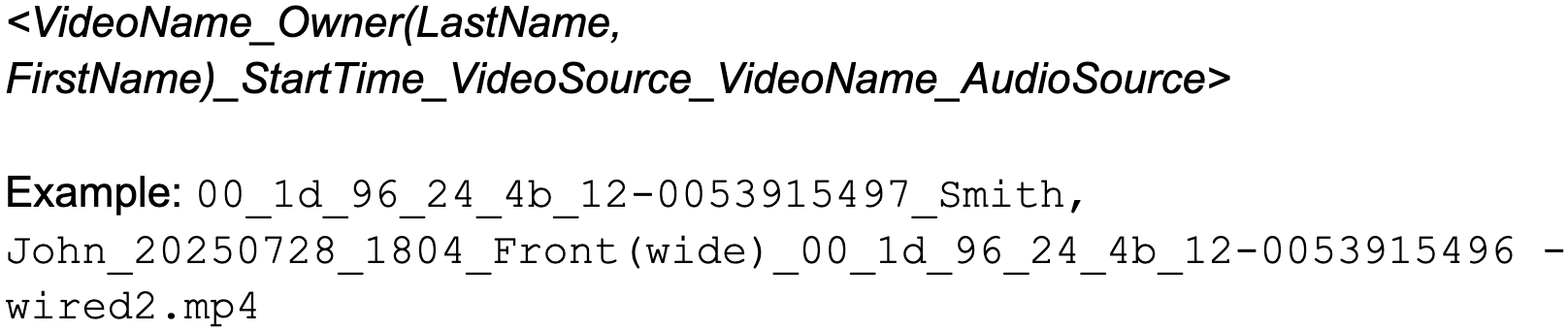
File naming conventions have been updated for better understanding. See changes below:
Body cameras’ naming format now follows:

In-car video naming format now follows:

The naming format for evidence files with mixed audio or video from two different devices now follows:
Read more in the CommandCentral DEMS User Guide.
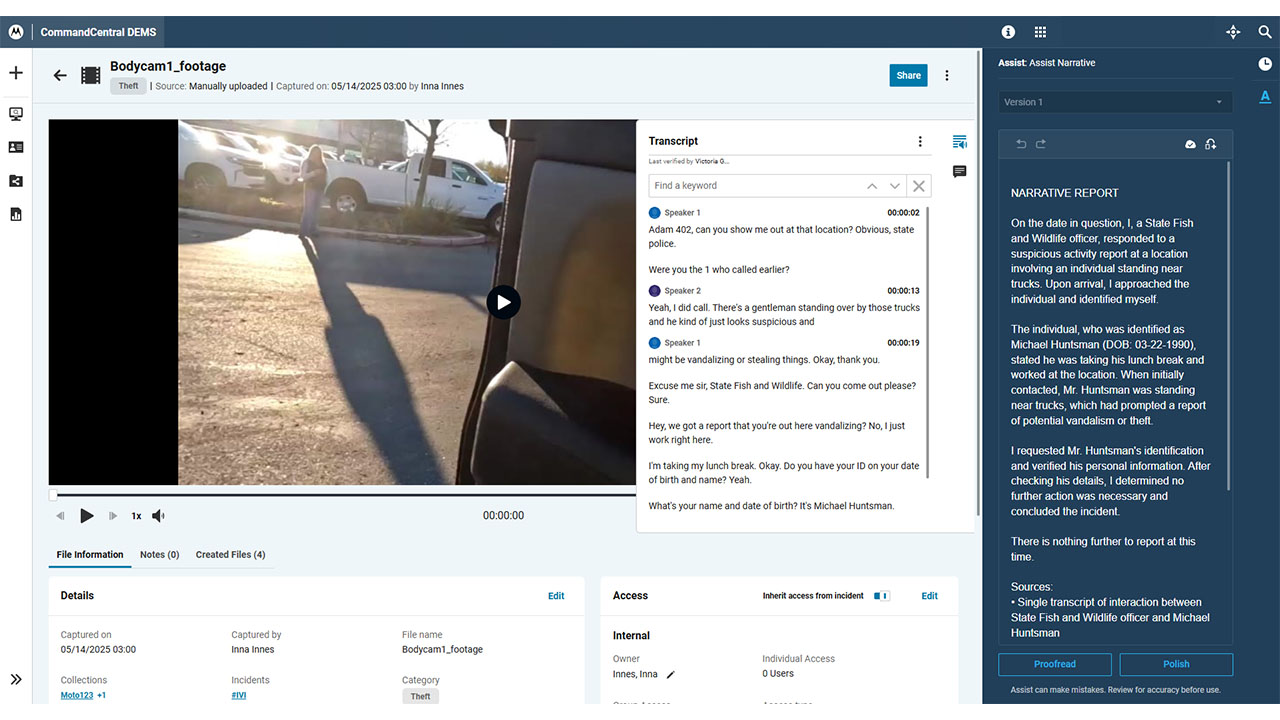
Assisted Narrative can help you build and edit your incident narratives quickly while maintaining accuracy. Assist AI helps you write your narratives by cross-referencing up to 10 different audio or video files, but it never replaces your memory or adds new information. With the ability to edit and required verification, you never leave the driver’s seat.
This feature is now available to all CommandCentral DEMS Plus customers. However, administrators have the ability to enable or disable this feature depending on agency preferences.
Learn more about the recent CommandCentral DEMS enhancements.
Experience improved evidence metadata accuracy with “capture by” and “uploaded by” fields to track who took what actions with digital evidence. Changing the file owner will not impact these fields, preserving the original information. This update also includes a new search feature to search by who captured evidence. The owner of previous evidence will be automatically assigned to these fields.
CommandCentral DEMS now supports redaction for videos up to 12 hours in length.
Read more in the CommandCentral DEMS User Guide.
Get early access to Assisted Narrative, which helps you streamline the narrative creation process. Generate a draft from one audio or video file, then use the proofread and polish tools to clean it up. Assisted Narrative never adds new info, and with the ability to edit and verify, you never compromise evidence control.
This feature is available to CommandCentral DEMS Plus customers. If you would like to enable early access, please reach out to your Motorola Solutions sales representative.
Manage even more digital evidence in DEMS with the ability to convert unsupported files. With this feature, you can convert the following files;
MOV, WEBM and MKV files will be converted to MP4.
HEIC/HEIF and TIFF files will be converted to JPG.
DOC/DOCX, CSV, XLSX/XLS, TXT and HTML files will be converted to PDF. Files will be automatically converted upon upload.
View a bigger picture with the ability to choose how you listen to SVX audio. The voice-only playback provides clear and clean audio with background and echo cancellation when you only need to hear what the main parties are saying. Or you can listen to the raw audio to catch everything.
Changes to your organizational hierarchy in CommandCentral Admin appear in CommandCentral DEMS. These hierarchies allow you to determine which agency employees can view digital evidence you store in DEMS.
We’ve enhanced the AI-redaction experience to make the process more efficient. Along with the general improved performance of the tool, you can now auto-track multiple objects at the same time and redact audio in bulk.
Read more in the CommandCentral DEMS User Guide.
CommandCentral Evidence has officially been renamed to CommandCentral DEMS. This change is designed to provide you with a true digital evidence management experience. Don’t worry, you will still have access to all of the tools from CommandCentral Evidence, and no additional actions are required from you. CommandCentral DEMS provides more features that will make your evidence management more efficient.
Learn more about the recent CommandCentral DEMS enhancements.
Keep your digital evidence centralized and organized with collections. The collections view allows you to create groupings for digital evidence in a way that works for your agency’s specific needs. You can now add the same piece of digital evidence to more than one collection without having to create a duplicate, making your cases more accurate while optimizing storage space. Collections is designed to help you stay organized, find evidence faster and efficiently share files with your partners, saving you valuable time.
In order for users to create collections, the “create collections permission” must be enabled.
Maintain granular control of your digital evidence by selecting the individuals and groups that should have access to specific files.
You can now create specific tags directly in CommandCentral DEMS, making the process more streamlined and specific to your agency. Create tags that relate to the terminology used in your agency from the same place you manage the digital evidence it relates to. You can also edit or delete these tags directly within CommandCentral DEMS, making the process more efficient.
Read more in the CommandCentral DEMS User Guide.
Find what you’re looking for faster by searching with new and more specific filters, such as an officer’s name or the location of an event. These filters create more targeted search results, helping you to search more efficiently.
Search for evidence based on a geographical location with the new map view.
You can now view more file types, including videos, images, audio files and PDFs.
You can now generate transcriptions quicker than before with more accuracy.
Meet the requirements of your work partners, such as prosecutors, with the ability to securely export your evidence to Evidence.com. Contact your Motorola Solutions representative to learn more.