
What's new with CommandCentral Admin
Discover the latest CommandCentral Admin product updates.
We are constantly working hard to make sure CommandCentral Admin is delivering the information you need in an intuitive and time-saving workflow. To help achieve this, we are thrilled to announce six new capabilities designed to elevate your administrative and security experience, available in the latest version of CommandCentral Admin.
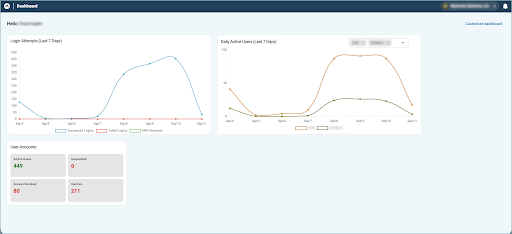
The new Admin Dashboard allows agency administrators to view actionable or informative data at a glance directly on the dashboard upon login. Admins can assign widgets to specific roles, with the available widgets depending on the applications assigned to that role. When a user logs in, they will be able to see and utilize the widgets enabled for their role, keeping their focus on the tasks at hand for their specific workflow.
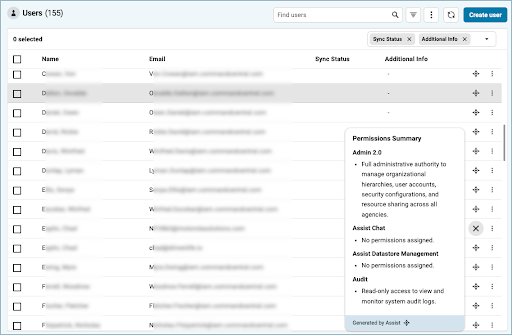
Administrators looking for better system visibility will appreciate our new AI Summaries feature. Quickly understand which permissions a user has been granted without needing to dig through multiple menus. It works easily: after enabling Admin AI capabilities on the Organization overview → Security configuration page, you can simply click on the AI Summary icon on the user, group or role list to view granted permissions.
While viewing a specific user record, you can also see a detailed list of all the permissions a user has been granted across all of their assigned groups and roles.
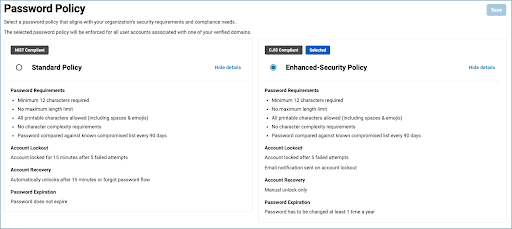
To further enhance high-security standards across your organization, agency admins can now implement a structured Password Policy. Simply select from two predefined policies in the system: a Standard policy based on NIST 80-53 or an Enhanced policy based on CJIS. Once it is set, it only impacts users with an email domain that has been verified. However, it's important to note that this impacts all tenants and products where Unified ID is used for user authentication.
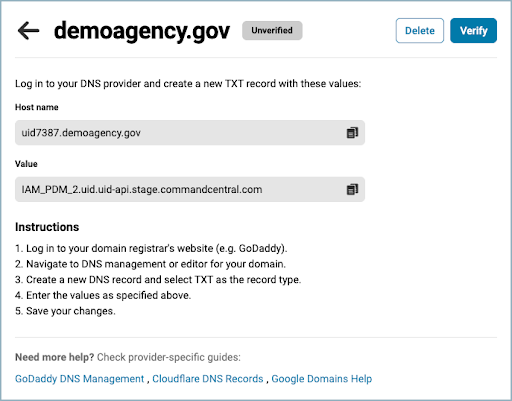
Another powerful capability designed for agency administrators is Verified Domains. Domain verification is an absolute requirement if you want to set a password policy, establish a system use notification or restrict what IP addresses a user can log in from. With this latest enhancement, we're simplifying that process. To verify domain ownership, simply use DNS TXT records to register and confirm it in the system.
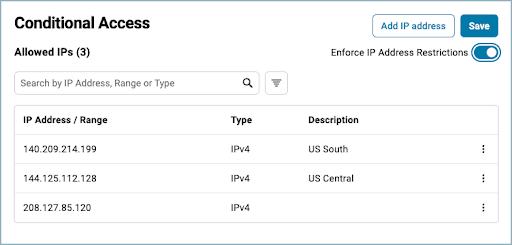
In addition to Verified Domains, you can tighten your network control with Conditional Access. This feature restricts users to only logging in from known, trusted IP addresses. Simply define the specific IP addresses that user traffic must originate from and then enable enforcement.
If any user logs in with a verified domain email address, they will not be allowed to authenticate unless they are using one of your predefined IP addresses. Again, it's important to note that this impacts all tenants and products using Unified ID.
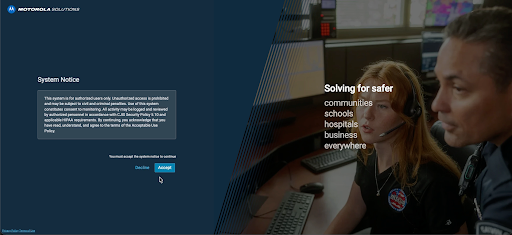
The new System Use Notification feature is built for agency admins who need to share important compliance or legal information upon login. Use this newest feature to define the exact message that users must acknowledge each time they log into the system. Administrators can easily enable or disable it at any time. Like the other security controls, this applies across all tenants and products where Unified ID is in place for user authentication.
These new enhancements, from the at-a-glance visibility of the Admin Dashboard and AI Summaries to the new enhanced security controls, are designed to simplify and protect your daily operations. We are excited for you to experience a more secure and efficient environment. Log in to CommandCentral Admin today to start using the most recent features.
Your officers can now quickly log in to their in-car M500E devices with a simple badge scan, thanks to new Radio Frequency Identification (RFID) support. This faster login allows personnel to focus on the job at hand instead of worrying about manual credential entry, streamlining field workflows.
Administrators can easily manage hundreds of user RFID badge IDs through comma-separated value (CSV) imports and exports. This feature enables efficient bulk-population for large-scale deployments, significantly speeding up both initial agency onboarding and ongoing maintenance.
We are excited to announce a revamp of the current 1:1 relationship between roles and groups, giving administrators a much less restrictive experience. Previously, if you wanted to assign a common base role across multiple groups, you had to manually recreate those permissions for each group.
Now, administrators can manage roles across multiple groups. This change significantly cuts down on repetitive tasks, prevents role explosion and ensures consistent permissions across your agency.
Please note: If the multi-group role setting is enabled, the Admin 1.0 service must be disabled.
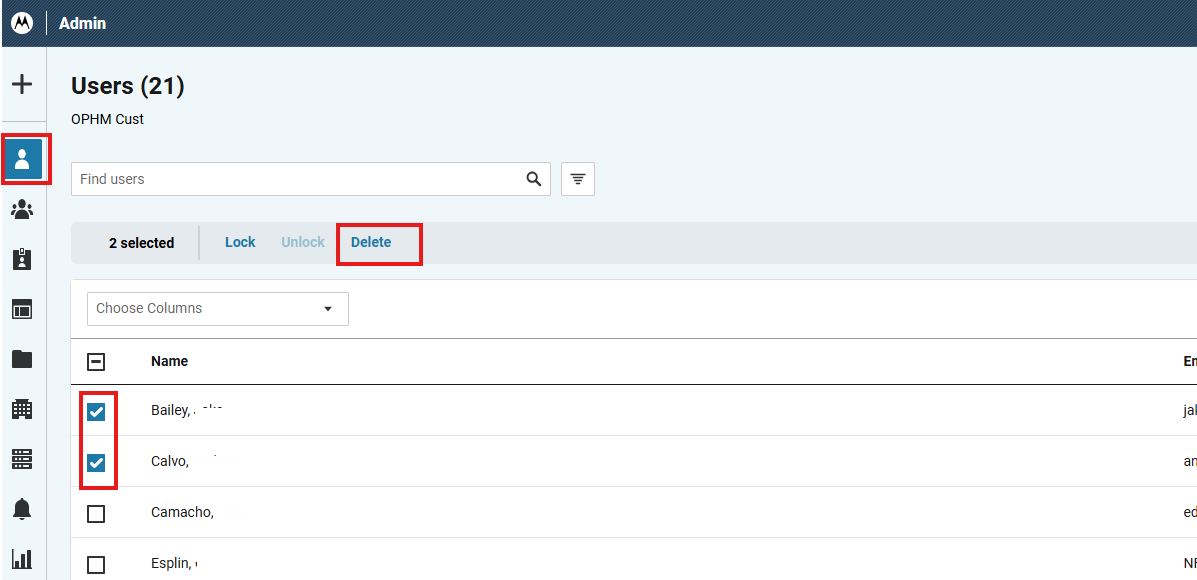
We’ve made managing large rosters much simpler with bulk delete actions. Now, administrators can delete tens or even hundreds of users simultaneously when offboarding staff. This new feature saves hours of tedious manual data entry.
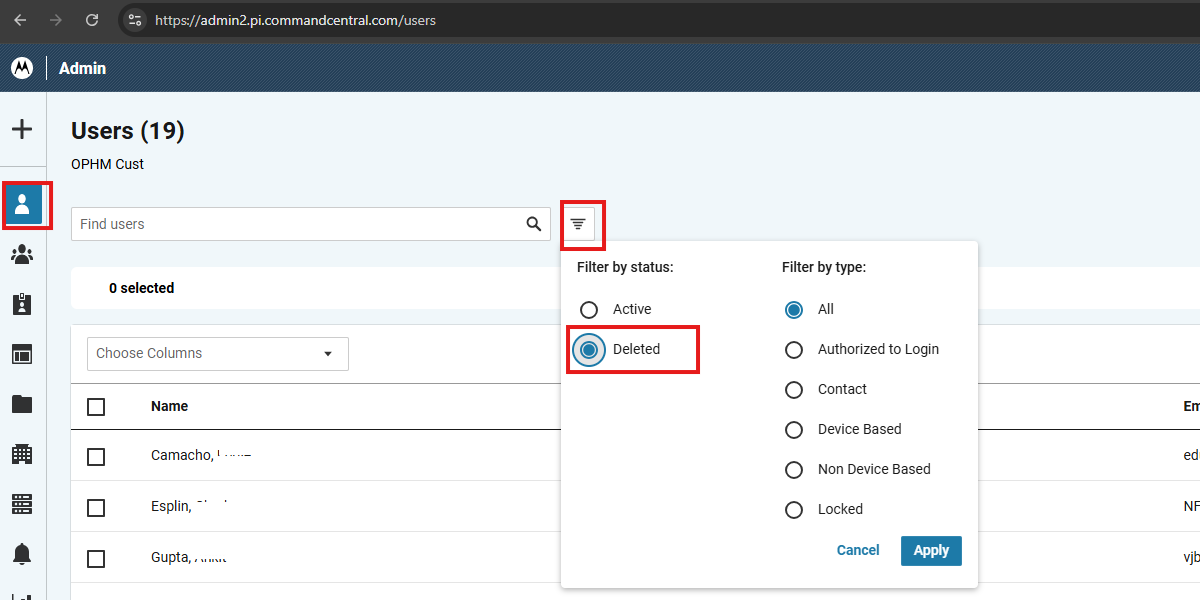
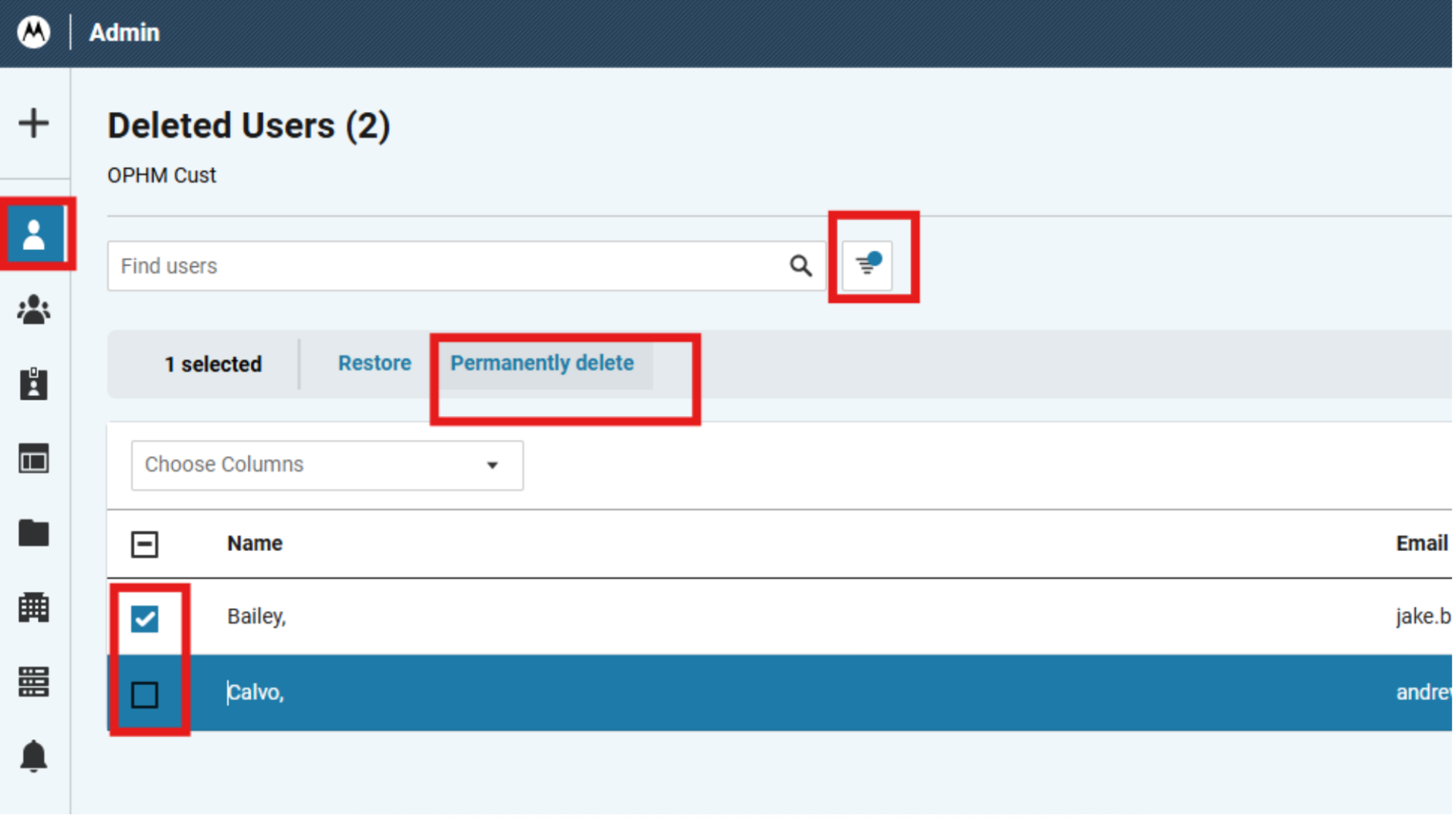
To safeguard your data integrity, we introduced a two-tier deletion process:
Soft delete: Select multiple users from the main list and perform a “Bulk Delete” action. We recommend this first step because it removes users from active status but prevents accidental data or permission loss.
Hard delete: For permanent removal, filter the list to show “Deleted” users. Then, simply select the desired records and use the “Permanently Delete” bulk action.
We’ve made big improvements to the user import workflow, giving you better clarity and flexibility when you manage large datasets. The workflow you already know is still there, but we’ve added intelligent messaging and dynamic error handling to support your most complex agency updates.
Now, when you upload a large CSV with hundreds or thousands of user records, you see real-time status updates so you can better manage your time during the process. Even better, if errors are found in specific records, you can fix them right in the dialog box. This eliminates the need to cancel and restart the entire CSV upload for minor data mismatches. You get your administrative maintenance work done faster and with more confidence.
Tired of having to work in default views? With this latest update, you as an application administrator can customize the Users list in CommandCentral Admin to work the way you do, surfacing the most important data for your agency’s workflows. This update will not only make it more convenient, but it will also save valuable time along the way.
Now, you have the option to customize your Users list by adding, rearranging, deleting and even sorting the available columns in the Users list. This ensures the right data is front and center for your most common tasks in CommandCentral Admin. And best of all, your user configurations are saved even after logging out, which means you can set your optimal view once and be done. They’ll also stay in place after refreshing the Users list to see recent changes. As a note, there are a maximum of 12 columns in the Users list.
If you’ve ever needed to create a role that was very similar to an existing role at your agency, we’ve just made that whole process a lot smoother. With Role Cloning, you can now easily duplicate a group of permissions for a new role that you want to create, saving you time and making you more efficient in your administrative tasks.
Similar to duplicating a user, you’ll simply duplicate the existing role from the Users list view. This will assign all roles and permissions of the existing role to the newly cloned role. This saves administrators from manually assigning each individual permission and allows you to put that time toward making the necessary adjustments as needed.
Please note: This update is only available if your agency has already enabled the ability to create roles separately from groups. If you have not enabled this and would like to, you will need to contact the support team.
This newest feature enables administrators to store contact details of individuals or service providers, without treating them as a normal user with login access and assigned permissions. This could be something like a tow company or a public defense attorney who would never have a need to log in to CommandCentral. This will be particularly relevant to administrators who manage products such as CommandCentral CAD, Aware or RMS.
In the “Users” module, admins can create a new user and choose the “Contact” radio button option to create a non-authenticating contact user. This will make it so the email ID is not mandatory. We have also enhanced the filter on the “Users” list page to filter specifically for “Contacts.” You can check out a video walkthrough of this new feature here.
The new Bulk Actions feature enables administrators to perform Archive/Restore and Lock/Unlock operations on multiple user records in one swift action, eliminating repetitive steps when performing the same task across multiple records.
When an administrator goes to the Users list view and selects multiple users, a new action bar appears. This will let the admin perform Archive/Lock/Unlock actions on multiple users at the same time.
Motorola Solutions understands the importance of personal identifying information (or PII) and how critical it is to keep that data locked down from the masses. However, individual users often want to be able to see their own information without going through numerous hoops. With this newest update, individual CommandCentral users can easily view the PII that is part of their user record. Users can access their Profile via the top-right corner from any page on the CommandCentral application.
Tired of hitting the federated login multiple times in a row? With this newest update, administrators on CommandCentral can selectively bypass the federated login. For customers who have federated their domain for authentication, this feature enables an administrator to designate specific accounts that can use the local authentication. This will cause the designated accounts to not be redirected to the federated identity provider, saving time during login without sacrificing security.