
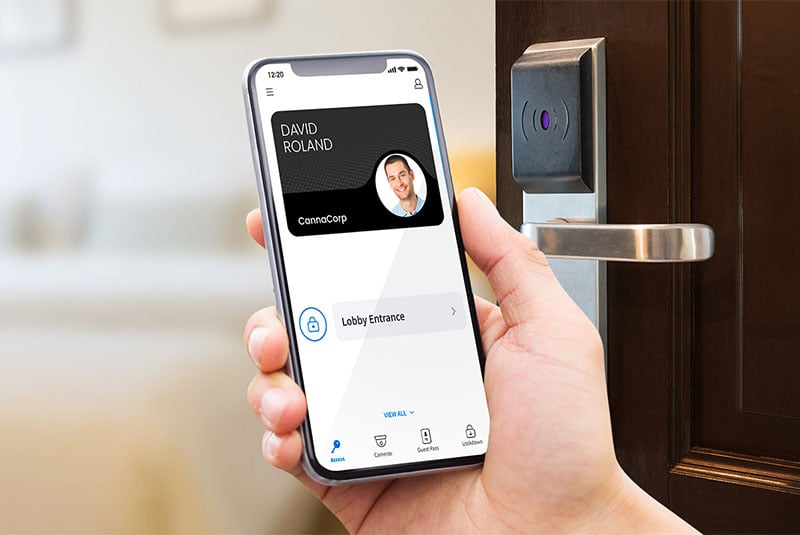







The smartphone has become an everyday tool for communication, identification, payments and work. It can also serve as a secure digital key for entering offices, facilities, campuses and other controlled spaces.
That is the basic idea behind mobile credentials for access control. Instead of issuing a physical badge or key fob, an organization can provide an authorized user with a digital credential stored on their mobile device. Depending on the system, users may access doors through an app, digital wallet, QR code, link, Bluetooth, NFC or another authentication method.
But the bigger opportunity is not simply replacing a plastic card with a phone. Mobile access control can change how organizations manage access altogether. Credentials can be issued remotely, permissions can be modified as responsibilities change, temporary access can be provided to visitors and teams can manage users across multiple locations through a centralized platform.
Modernize physical access
Improve security, convenience and flexibility for your organization with a modern, scalable access control system.
- Centralized, multi-site management
- Flexible mobile credential options
- Seamless security integrations
The benefits of mobile credentials for access control
Organizations considering a mobile access control system may benefit from:
- Simplified credential management: Digital credentials can be issued, changed and revoked without physically distributing a card or fob.
- Improved security: Mobile credentials can be protected by device security features such as passcodes and biometrics, depending on the implementation.
- Faster onboarding and offboarding: Access permissions can be assigned or removed digitally when employees, contractors or tenants join or leave an organization.
- Reduced administrative work: Security and facilities teams can spend less time managing physical credentials.
- Greater convenience: Employees and authorized users may be able to access doors using a device they already carry.
- Flexible temporary access: Visitors, contractors and other short-term users can receive time- or location-limited credentials.
What are mobile credentials?
A mobile credential is a digital authorization that allows an approved user to access a secured area using a smartphone or another compatible mobile device. In a traditional access control environment, a user might present a physical card or fob to a reader. With mobile phone access control, the credential is instead associated with the user's mobile device.
The credential itself is only one part of the system. A complete mobile access solution typically includes:
- A digital credential assigned to a specific user.
- A mobile device capable of presenting that credential.
- A reader or access point capable of receiving the credential.
- An access control platform that determines whether the user has permission.
- Access policies defining where and when that credential can be used.
A smartphone does not automatically become an access control system simply because it can communicate with a door. The security comes from the combination of the credential, authentication method, reader, access policies and management platform.
How do mobile credentials work?
The process generally follows a simple sequence:
- Credential issued
- Credential stored on device
- User presents credential
- System verified authorization
- Door unlocks
- Event is recorded
An administrator first creates or assigns a credential to an authorized user. Depending on the platform, that credential might be delivered through an app, link, QR code or digital wallet. When the user approaches a controlled door, the smartphone communicates with the reader using a supported technology such as Bluetooth or NFC. The access control system verifies the credential and checks the user's permissions.
If the credential is authorized, access is granted. If it is not authorized, access is denied and the event may be recorded for security monitoring. Some systems can also support touchless experiences in which users do not need to manually open an app every time they enter. The exact experience depends on the technology and configuration of the mobile access control system.
Different types of mobile credentials
Since there are many mobile credentials the right option depends on the users, security requirements, devices and access environment.
| Credential type | How it works | Common application |
|---|---|---|
|
Mobile app |
User presents a credential through an access control app |
Employees, tenants, staff |
|
Digital wallet |
Credential is stored in supported smartphone wallet |
Employee and staff access |
|
Bluetooth |
Phone communicates wirelessly with a compatible reader |
Hands-free or convenient door entry |
|
NFC |
Phone communicates with a reader when brought into close proximity |
Tap-based access |
|
QR code |
User presents a scannable code to a compatible reader |
Visitors and temporary access |
|
Secure link |
Credential or invitation is delivered through a link |
Contractors, guests, temporary users |
|
PIN/passcode |
User enters a code rather than presenting a digital credential |
Selected doors, temporary users |
|
Biometric authentication |
Device biometrics help verify the person using the credential |
Higher-security applications |
Allow users to select a credential type to see its typical security, convenience, administrative effort and best-fit use case. The important takeaway is that these methods are not necessarily mutually exclusive. An organization may use app-based credentials for employees, temporary QR codes for visitors and another authentication method for specialized areas.
Common use cases of mobile phone access control
Mobile access is particularly useful when an organization has a large or changing population of users, multiple locations or a need to issue access remotely.
Offices and corporate facilities
Organizations can use smartphone commercial access control systems for employees, contractors and visitors. Employees may use their phones for everyday entry while temporary credentials can be issued for guests or contractors.
Multi-tenant buildings
Property managers can provide tenants with digital credentials and adjust permissions when occupants move in, move out or require apartment access control to additional areas.
Education
Schools, colleges and universities can have large populations of students, faculty, staff, contractors and visitors. Mobile credentials can provide another way to manage access across buildings and designated areas.
Healthcare facilities
Hospitals and other healthcare environments can have complex access requirements involving employees, clinicians, contractors and restricted areas. Mobile credentials may help organizations manage permissions according to roles and locations.
Hospitality
Hotels, resorts and other hospitality environments can use mobile access for staff, guests and authorized service providers, depending on the access control infrastructure.
Construction and temporary worksites
Mobile credentials can be useful when the workforce changes frequently. Temporary access can be issued to contractors and removed when a project or assignment ends.
Gyms, fitness facilities and recreational spaces
Mobile access can provide members with a convenient credential while allowing operators to manage gym access permissions digitally.
Multi-site organizations
One of the strongest applications for mobile access control is organizations that operate across several locations. Instead of managing separate physical credentials for each facility, administrators can use a centralized system to assign different permissions to the same user. For example, an employee might have general access to their primary office but limited access to another facility.
This creates a more flexible access model: one user, one credential with multiple locations and different permissions. That can be particularly valuable for organizations with mobile employees, regional teams, property portfolios or distributed operations.
Quick comparison: Mobile credentials and other access methods
Mobile credentials are not automatically the best solution for every door or every organization. Comparing them with other credential types can help security teams determine where they make the most sense.
Is mobile access control right for your business?
Before adopting an app based access control solution, ask:
- Who needs access? Employees, tenants, students, visitors, contractors or a combination?
- How frequently do permissions change? Frequent employee turnover or temporary access needs can make digital credential management particularly valuable.
- How many locations do you manage? Multi-site organizations may benefit significantly from centralized management.
- How much foot traffic does the facility receive? High-volume environments may require fast, frictionless authentication.
- What security level is required? Consider whether biometrics access, multifactor authentication, audit trails or additional controls are necessary.
- What infrastructure is already installed? Existing readers and controllers may influence how easily mobile credentials can be introduced.
- Cloud-based or on-premises? Consider your organization's IT requirements, connectivity, data policies and operational preferences.
- What is your budget? Look beyond installation costs and consider credential issuance, administration, replacement, maintenance and future expansion.
- What happens when someone loses a phone? Make sure your access platform has an appropriate process for revoking and replacing credentials.
- Do users have compatible devices? Device compatibility and organizational policies should be evaluated before deployment.
What to know before switching to mobile access credentials
Moving from physical credentials to mobile access does not necessarily mean replacing an entire access control infrastructure.
1. Compatibility with existing access infrastructure
Start by evaluating the readers, controllers, locks, software and credentials already in place. Some environments may support mobile credentials through existing infrastructure, while others may require reader upgrades or additional hardware.
2. Integrations with other systems
Access control rarely operates independently. Consider how mobile access will interact with:
- Video security
- Visitor management
- Building management systems
- Identity and HR platforms
- Alarm systems
3. Scalability and future plans
Think beyond the first deployment. If your organization expects to add locations, increase its workforce, introduce hybrid work policies or expand visitor access, choose a platform that can accommodate those changes.
4. User experience
Security technology is only effective when people can use it correctly. Evaluate how users receive credentials, how they authenticate, what happens if their phone is unavailable and what support process exists when something goes wrong.
Physical and compliance considerations
Mobile access introduces another consideration: data privacy. Organizations should understand what information their access control platform collects, where it is stored, how long it is retained and who can access it.
Access events may reveal information about when an individual entered or exited a facility. Depending on the organization and jurisdiction, this information may be subject to privacy, employment, security or records-management requirements.
Before deployment, review:
- What personal information is collected
- Whether location information is collected beyond access events
- Where information is stored
- How data is encrypted and protected
- How long access records are retained
- Who can view access logs
- How credentials are revoked
- What happens to user data when an employee or tenant leaves
- Applicable privacy and security requirements
Thinking beyond the key card
The biggest benefit of mobile credentials isn't simply that people can leave their key cards at home. For organizations, mobile access control can provide a more flexible way to manage the relationship between people, permissions and physical spaces.
Instead of treating access credentials as something that must be physically issued and collected, organizations can manage them as part of a digital security environment. That can make it easier to onboard users, remove access, support visitors, manage multiple facilities and adapt permissions as operational needs change.
The right solution will depend on your existing infrastructure, security requirements, users, budget and long-term plans. But for organizations looking to modernize physical access, mobile credentials are worth considering as part of a broader access control strategy.
Frequently Asked Questions
Answers to common questions about mobile credentials, including pricing and technical requirements.