
Discover how Guardian ICCS is evolving to meet modern control room needs with updates that focus on call handling, security and integration with other systems for greater efficiency.
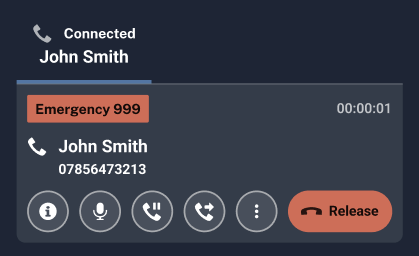
The active call tiles have been completely redesigned for a cleaner look, and the intuitive held call interface now clearly displays a “Connected” status. Additionally, active calls are now pinned to the bottom of the Call Stack. This reduces cognitive load in busy control rooms, helping call handlers manage multiple calls efficiently and reducing the risk of errors.
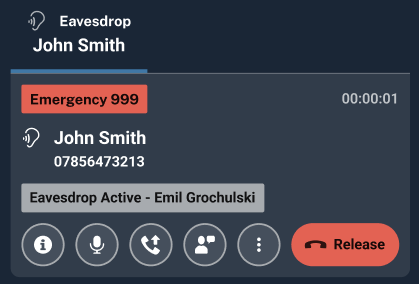
When supervisors use monitoring functions like eavesdropping or whispering, the call tile now shows the display name of the user being monitored, not their username. Operators can also optionally view the display name of the supervisor who is monitoring them. This improves clarity and efficiency by making it easier for supervisors to identify individuals at a glance when supporting their teams.
We have introduced comprehensive audit trails and reports that log each stage of a call transfer, including attempts, completions and failures. This provides crucial transparency and accountability for investigations, compliance and building public trust, ensuring professional standards departments have the detailed data they need.
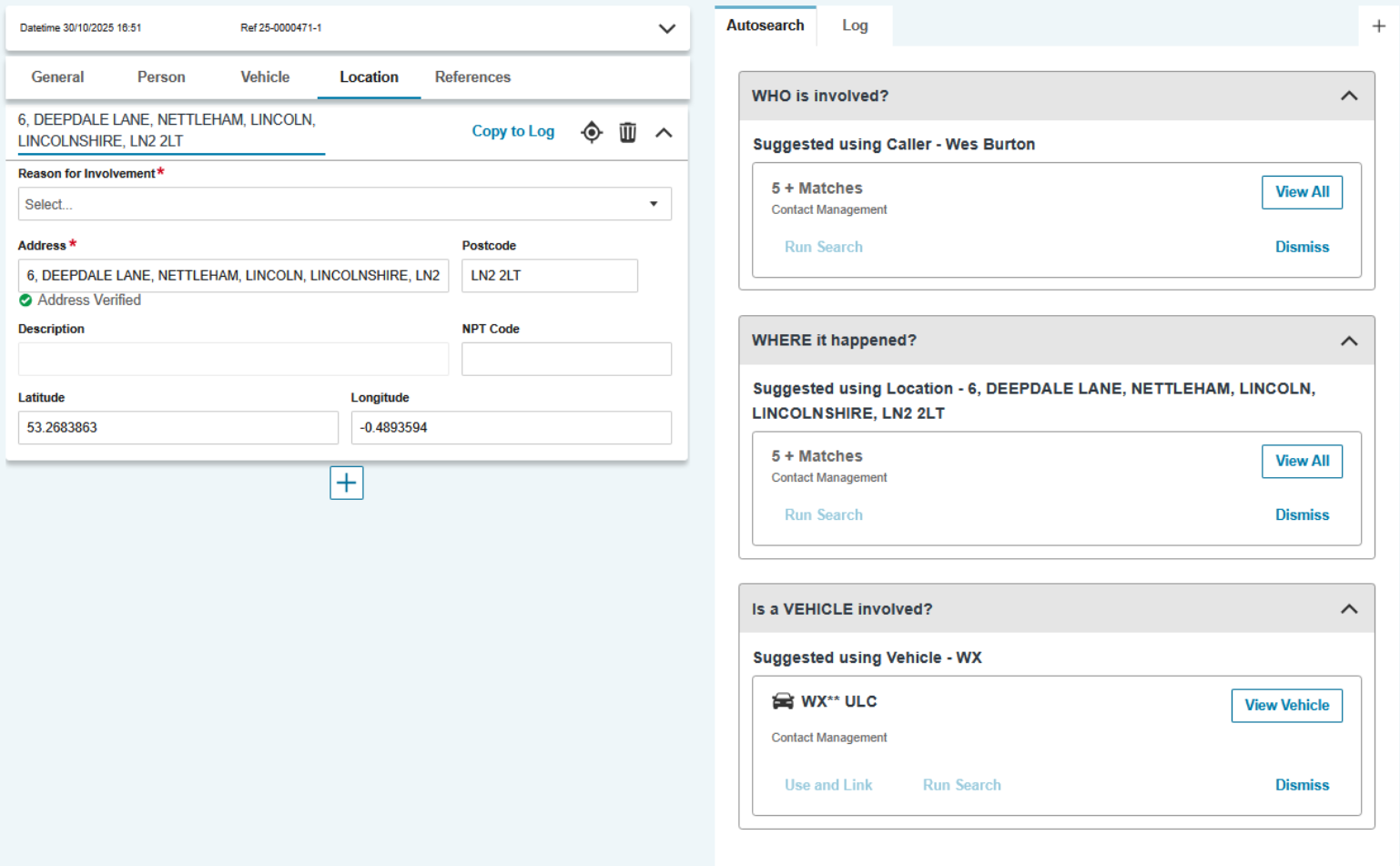
We now autosearch by entity (Person, Vehicle, Location) the Contact Management database and present these results in a Who, Vehicle, Where card. This allows you to see an entity and its involvement in an incident, with the details of this incident presented in either table view or, in the case of a location, on the map.
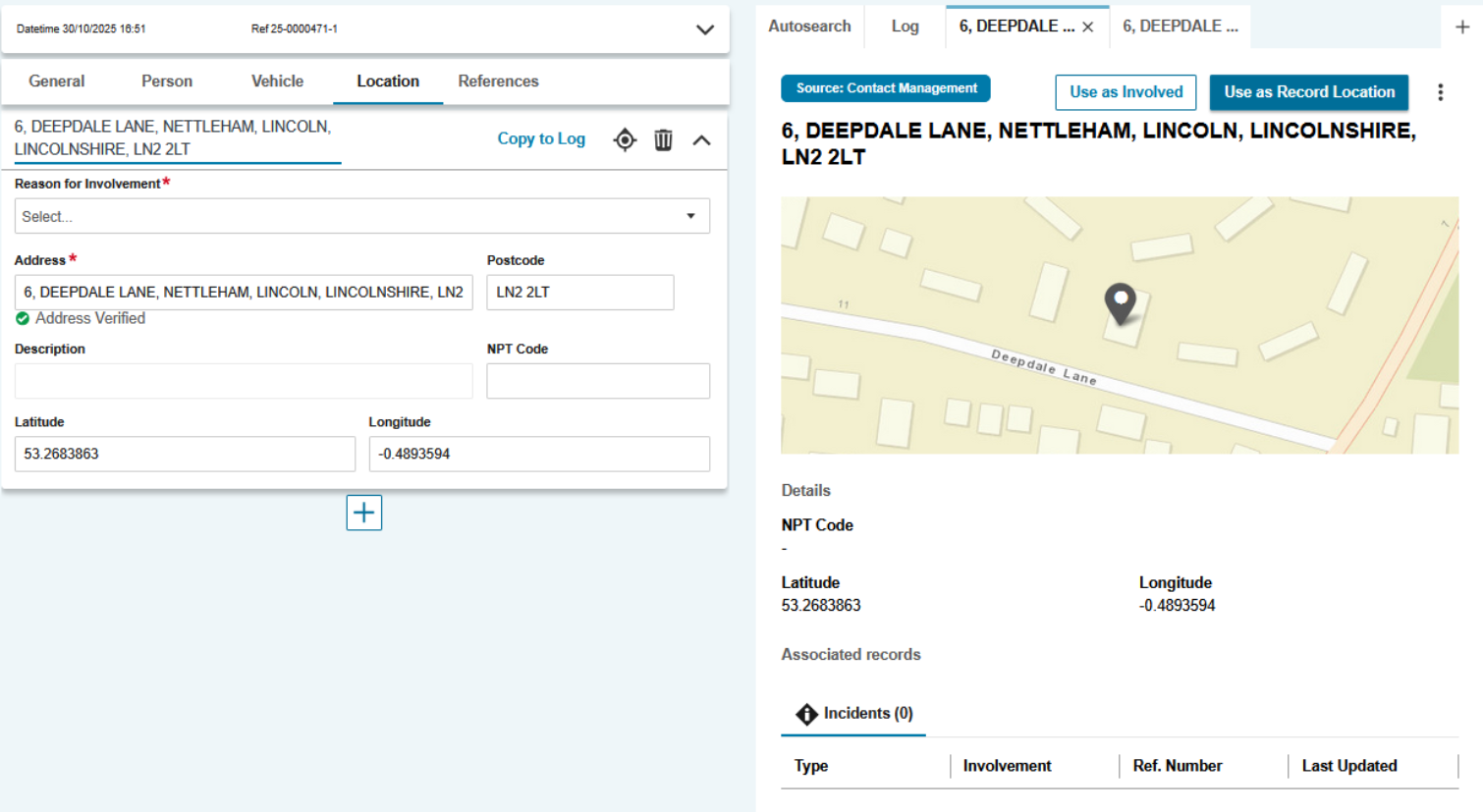
New API endpoints provide richer, more detailed information for people, vehicles and locations directly within search results. This supports the front-end in displaying more comprehensive “Who,” “Where” and “Vehicle” cards, reducing the need for users to switch between systems and providing more context up front.
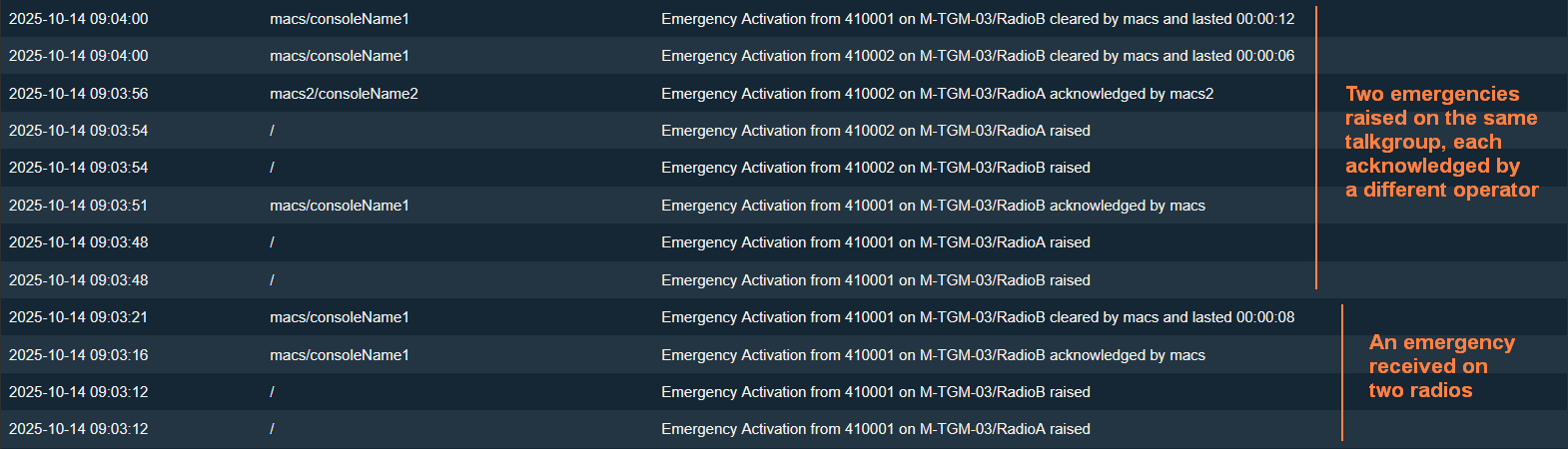
The most significant improvement in these releases is a wave of specific, high-value audit trails that deliver the rich, granular data needed for investigations and compliance. This moves beyond generic call logs to provide a clear, auditable history of critical radio operations.
Emergency Activations: The audit trail now logs when an emergency is raised, acknowledged and cleared, including the total duration.
Radio Patch/Combine Changes: Now audited when talkgroups are added to or removed from combine groups on DCS ports.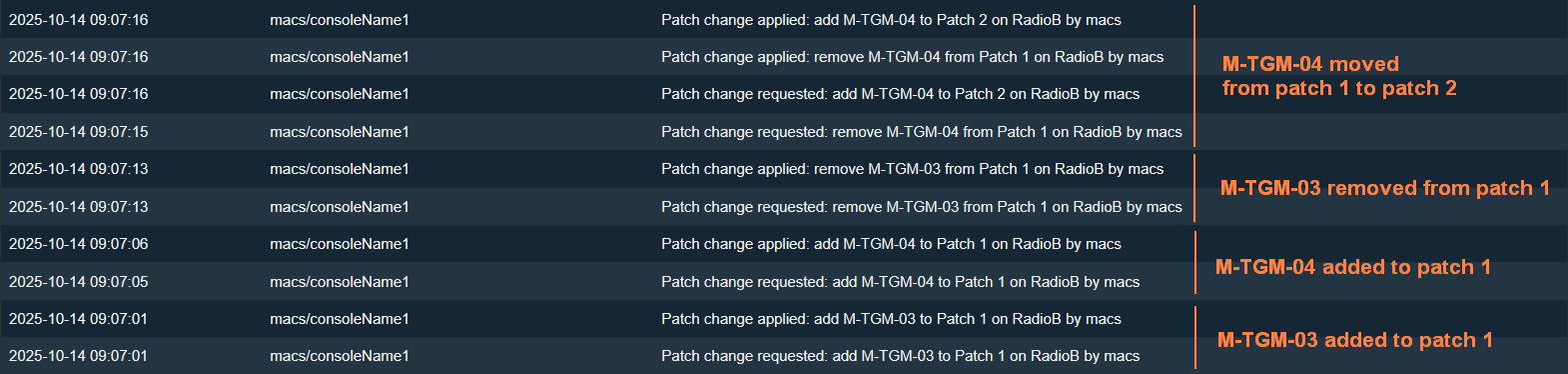
Private and Group Radio Calls: Audit logs now provide specific details for private calls (who initiated, answered and terminated) and group calls, including the talkgroup and duration.


Ambient Listening (AL) calls: Audit entries now distinguish when an AL call is initiated, successfully connected and terminated, including who performed the action.

The new call stack will include an ‘Incoming’ panel, which will include incoming but unanswered calls, radio transmissions and unacknowledged alerts (similar to the existing call stack). The panel will not include answered calls, as those will now be moved to the ‘Active’ panel. This reduces cognitive load on call handlers, providing a clear visual divide between incoming and active calls.

We’ve updated the call stack toolbar. It retains all current functionalities while also improving the user experience. A key improvement is that we’ve added two new buttons to the call stack toolbar:
Silencing incoming radio traffic
Silencing loudspeaker alerts
Previously, these functions were only accessible through the Comms page. Now, these critical features are constantly visible and readily available to users, improving overall operational efficiency.

We’ve updated the call stack toolbar. It retains all current functionalities while also improving the user experience. We’ve created an operational status panel to show the status of key Guardian ICCS functionality (such as radio and phone audio). This reduces cognitive load on call handlers, providing a quick overview of system health while also taking up less visual real estate on the screen.

We’ve extended the character count for talkgroup tiles to more than ten characters. This ensures users can view both the talkgroup name and DCS pool without the DCS pool being cut off unnecessarily.

Operators can now choose to enable real-time, AI audio enhancement on an individual call basis. This minimizes background noise and reduces the need for callers to repeat themselves, resulting in a smoother experience for both parties.

Guardian ICCS now supports EISEC V2. The improved architecture from BT has enabled us to move to tried and tested, industry-standard techniques for providing resilience both internally and to BT. Extensible protocols mean the potential to convey more information (when available). This will be particularly significant for future developments by BT regarding eCall and telematics. Finally, the time limit on our side for ongoing AML has been removed, and end-of-call requirements are now fully met.
For international customers, when an officer’s radio enters emergency mode, Guardian ICCS can now be configured to automatically make an ambient listening call to the radio. This makes it easy for operators to listen into the officer’s radio and stay informed about the unfolding situation on-scene.

Operators can now right-click and add individual pins to the contact management map by hand, instead of requiring What3Words or gazetteer search. This is important for incidents whose locations do not already have What3Words or gazetteer information associated with them – for example, because they occur at a junction, or in a field.

Supervisors can now hide the contact management search results tabs (CAD, RMS) from certain groups of users via permissions. This may be relevant for organizations that use a switchboard model, in which call takers should not have access to sensitive data.

The outbound call ringtone now loops as long as necessary, where previously it only played once.
Guardian ICCS will now display a pop-up to notify the user if an audio device comes unplugged.
We’ve improved consistency between the information shown within the contact management tab and the information shown when users click the hyperlink to display it as HTML.
To make address searching consistent with other areas of contact management, searches will now continue even if the address field is out of focus.
Users can now set a preferred contact number and email for callers, if they have more than one.
Grouped call tiles are now collapsed by default. Answering a grouped call now answers the longest ringing call. If a user wants to choose a specific call in the queue, then they can expand the call group and select it. This saves time for call handlers, eliminating the need to scroll past multiple call tiles.

We’ve added an audible tone that call handlers will hear when a call is terminated, which minimises the risk that a call handler will miss a dropped call when their attention is focused elsewhere.

Now, supervisors can filter the supervision page based on the relevant user profile(s). This feature enables supervisors to quickly view all users with a specific profile (e.g., dispatchers or call handlers).

Operators can view and answer calls from any agency, and they can also answer calls from multiple agencies simultaneously. This improves call handling efficiency during busy periods by enabling supervisors to distribute their resources more effectively.

A user’s agency is now displayed below their username on the Supervisor page. This feature enables supervisors to quickly understand which agencies a user is operating on behalf of.


We’ve added a new field when creating a new user, which requires you to choose an agency for that user. This also applies to users created via Single Sign-On (SSO). This ensures users are assigned to the correct agency upon creation.

A user’s agency is now displayed on an inbound call tile. This feature provides more context for call handlers during particularly busy periods by enabling them to understand which agency they are answering a call on behalf of.

We’ve added a new Report tab within the Call Assist user interface, which enables supervisors to see an overview of all calls handled by the system within a configurable time period. This feature enables supervisors to understand the demands on their call handling resources more effectively and ensure best practices are being followed.
We’ve implemented new validations for the Niche Intel form to ensure mandatory fields are filled in correctly for specific source types. This ensures that data is accurate upon submission, reducing the need to spend time and money correcting incorrect information later on.
We have added the ability for call handlers to copy PNC Vehicle Information to the Log at the click of a button. This makes it easier for call handlers to capture accurate information in real time without needing to copy and paste or run multiple searches. This also replicates the functionality of PNC person searches.

Warning markers associated with people and vehicles are now shown not only on the PNC header but also on the person or vehicle record. This ensures that call handlers are aware of potential risks associated with an incident while still on a call.

If the coordinate system is set to Latitude and Longitude, operators can now see the Vicinity Risk information from Guardian CAD on the map. This ensures that operators can assess vulnerability accurately, regardless of whether they are using the Easting/Northing coordinate system or the Latitude/Longitude system.

An incident will now be opened in Storm CAD automatically after it has been transferred from contact management. This saves crucial time for an operator when dispatching officers to an incident, instead of needing to manually find the incident in Storm.
What3words Auto-Written to Contact Record Log
When a user adds an address in a What3words format, this will now automatically add a log entry into the Contact Record Log. Users no longer need to remember a W3Ws address and manually enter it into the log.
The call duration timer in the call stack will now display the call duration from the caller’s perspective, instead of resetting when a call is put on hold or transferred.
Guardian ICCS will now terminate a conference call after one minute of inactivity, freeing up resources and reducing visual clutter on the call stack.
We’ve increased the upper character limit for email addresses and numbers in the contact directory to 254 characters.